Factory design pattern
The classes and objects participating in the above class diagram can be identified as follows:
- Product - CreditCard
- ConcreteProduct- MoneyBackCreditCard, TitaniumCreditCard, PlatinumCreditCard
- Creator- CardFactory
- ConcreteCreator- MoneyBackCardFactory, TitaniumCardFactory, PlatinumCardFactory
Here are the code blocks for each participant
- Product
- namespace FactoryMethodDesignPatternInCSharp
- {
- /// <summary>
- /// The 'Product' Abstract Class
- /// </summary>
- abstract class CreditCard
- {
- public abstract string CardType { get; }
- public abstract int CreditLimit { get; set; }
- public abstract int AnnualCharge { get; set; }
- }
- }
- ConcreteProduct
MoneyBackCreditCard:
- using System;
- namespace FactoryMethodDesignPatternInCSharp
- {
- /// <summary>
- /// A 'ConcreteProduct' class
- /// </summary>
- class MoneyBackCreditCard : CreditCard
- {
- private readonly string _cardType;
- private int _creditLimit;
- private int _annualCharge;
- public MoneyBackCreditCard(int creditLimit, int annualCharge)
- {
- _cardType = "MoneyBack";
- _creditLimit = creditLimit;
- _annualCharge = annualCharge;
- }
- public override string CardType
- {
- get { return _cardType; }
- }
- public override int CreditLimit
- {
- get { return _creditLimit; }
- set { _creditLimit = value; }
- }
- public override int AnnualCharge
- {
- get { return _annualCharge; }
- set { _annualCharge = value; }
- }
- }
- }
TitaniumCreditCard:
- using System;
- namespace FactoryMethodDesignPatternInCSharp
- {
- /// <summary>
- /// A 'ConcreteProduct' class
- /// </summary>
- class TitaniumCreditCard : CreditCard
- {
- private readonly string _cardType;
- private int _creditLimit;
- private int _annualCharge;
- public TitaniumCreditCard(int creditLimit, int annualCharge)
- {
- _cardType = "Titanium";
- _creditLimit = creditLimit;
- _annualCharge = annualCharge;
- }
- public override string CardType
- {
- get { return _cardType; }
- }
- public override int CreditLimit
- {
- get { return _creditLimit; }
- set { _creditLimit = value; }
- }
- public override int AnnualCharge
- {
- get { return _annualCharge; }
- set { _annualCharge = value; }
- }
- }
- }
PlatinumCreditCard:
- using System;
- namespace FactoryMethodDesignPatternInCSharp
- {
- /// <summary>
- /// A 'ConcreteProduct' class
- /// </summary>
- class PlatinumCreditCard : CreditCard
- {
- private readonly string _cardType;
- private int _creditLimit;
- private int _annualCharge;
- public PlatinumCreditCard(int creditLimit, int annualCharge)
- {
- _cardType = "Platinum";
- _creditLimit = creditLimit;
- _annualCharge = annualCharge;
- }
- public override string CardType
- {
- get { return _cardType; }
- }
- public override int CreditLimit
- {
- get { return _creditLimit; }
- set { _creditLimit = value; }
- }
- public override int AnnualCharge
- {
- get { return _annualCharge; }
- set { _annualCharge = value; }
- }
- }
- }
- Creator
- namespace FactoryMethodDesignPatternInCSharp
- {
- /// <summary>
- /// The 'Creator' Abstract Class
- /// </summary>
- abstract class CardFactory
- {
- public abstract CreditCard GetCreditCard();
- }
- }
- ConcreteCreator
MoneyBackFactory:
- namespace FactoryMethodDesignPatternInCSharp
- {
- /// <summary>
- /// A 'ConcreteCreator' class
- /// </summary>
- class MoneyBackFactory : CardFactory
- {
- private int _creditLimit;
- private int _annualCharge;
- public MoneyBackFactory(int creditLimit, int annualCharge)
- {
- _creditLimit = creditLimit;
- _annualCharge = annualCharge;
- }
- public override CreditCard GetCreditCard()
- {
- return new MoneyBackCreditCard(_creditLimit, _annualCharge);
- }
- }
- }
TitaniumFactory:
- namespace FactoryMethodDesignPatternInCSharp
- {
- class TitaniumFactory: CardFactory
- {
- private int _creditLimit;
- private int _annualCharge;
- public TitaniumFactory(int creditLimit, int annualCharge)
- {
- _creditLimit = creditLimit;
- _annualCharge = annualCharge;
- }
- public override CreditCard GetCreditCard()
- {
- return new TitaniumCreditCard(_creditLimit, _annualCharge);
- }
- }
- }
PlatinumFactory:
- namespace FactoryMethodDesignPatternInCSharp
- {
- class PlatinumFactory: CardFactory
- {
- private int _creditLimit;
- private int _annualCharge;
- public PlatinumFactory(int creditLimit, int annualCharge)
- {
- _creditLimit = creditLimit;
- _annualCharge = annualCharge;
- }
- public override CreditCard GetCreditCard()
- {
- return new PlatinumCreditCard(_creditLimit, _annualCharge);
- }
- }
- }
Factory Pattern Client Demo
- using System;
- namespace FactoryMethodDesignPatternInCSharp
- {
- /// <summary>
- /// Factory Pattern Demo
- /// </summary>
- public class ClientApplication
- {
- static void Main()
- {
- CardFactory factory = null;
- Console.Write("Enter the card type you would like to visit: ");
- string car = Console.ReadLine();
- switch (car.ToLower())
- {
- case "moneyback":
- factory = new MoneyBackFactory(50000, 0);
- break;
- case "titanium":
- factory = new TitaniumFactory(100000, 500);
- break;
- case "platinum":
- factory = new PlatinumFactory(500000, 1000);
- break;
- default:
- break;
- }
- CreditCard creditCard = factory.GetCreditCard();
- Console.WriteLine("\nYour card details are below : \n");
- Console.WriteLine("Card Type: {0}\nCredit Limit: {1}\nAnnual Charge: {2}",
- creditCard.CardType, creditCard.CreditLimit, creditCard.AnnualCharge);
- Console.ReadKey();
- }
- }
- }
Output
Here, we are accepting input from the clients/users as to which class they want to instantiate.
We have the following ways to implement Dependency Injection.
Constructor Injection in C#
Construction injection is the most commonly used dependency pattern in Object Oriented Programming. The constructor injection normally has only one parameterized constructor, so in this constructor dependency there is no default constructor and we need to pass the specified value at the time of object creation. We can use the injection component anywhere within the class. It addresses the most common scenario where a class requires one or more dependencies.
The following is an example:
- using System;
- using System.Collections.Generic;
- using System.Linq;
- using System.Text;
- using System.Threading.Tasks;
- namespace propertyinjuction
- {
- public interface text
- {
- void print();
- }
- class format : text
- {
- public void print()
- {
- Console.WriteLine(" here is text format");
- }
- }
- // constructor injection
- public class constructorinjection
- {
- private text _text;
- public constructorinjection(text t1)
- {
- this._text = t1;
- }
- public void print()
- {
- _text.print();
- }
- }
- class constructor
- {
- static void Main(string[] args)
- {
- constructorinjection cs = new constructorinjection(new format());
- cs.print();
- Console.ReadKey();
- }
- }
- }

By passing the services that implemented the text interface the builder assembled the dependencies.
Property Injection in C#
We use constructor injection, but there are some cases where I need a parameter-less constructor so we need to use property injection.
The following is an example:
- public interface INofificationAction
- {
- void ActOnNotification(string message);
- }
- class atul {
- INofificationAction task = null;
- public void notify(INofificationAction at ,string messages)
- {
- this.task = at;
- task.ActOnNotification(messages);
- }
- }
- class EventLogWriter : INofificationAction
- {
- public void ActOnNotification(string message)
- {
- // Write to event log here
- }
- }
- class Program
- {
- static void Main(string[] args)
- {
- //services srv = new services();
- //other oth = new other();
- //oth.run();
- //Console.WriteLine();
- EventLogWriter elw = new EventLogWriter();
- atul at = new atul();
- at.notify(elw, "to logg");
- Console.ReadKey();
- }
- }
You cannot control when the dependency is set at all, it can be changed at any point in the object's lifetime.
Method Injection in C#
In method injection we need to pass the dependency in the method only. The entire class does not need the dependency, just the one method. I have a class with a method that has a dependency. I do not want to use constructor injection because then I would be creating the dependent object every time this class is instantiated and most of the methods do not need this dependent object.
The following is an example:
- using System;
- using System.Collections.Generic;
- using System.Linq;
- using System.Text;
- using System.Threading.Tasks;
- namespace propertyinjuction
- {
- public interface Iset
- {
- void print();
- }
- public class servic : Iset
- {
- public void print()
- {
- Console.WriteLine("print........");
- }
- }
- public class client
- {
- private Iset _set;
- public void run(Iset serv)
- {
- this._set = serv;
- Console.WriteLine("start");
- this._set.print();
- }
- }
- class method
- {
- public static void Main()
- {
- client cn = new client();
- cn.run(new servic());
- Console.ReadKey();
- }
- }
- }

Summary
This article helps to reduces class coupling, increase code reuse, improve code maintainability, improve application testing and help to easily do unit testing. In this article with code samples, we saw some use cases of dependency injection using C# and .NET.
Implementation
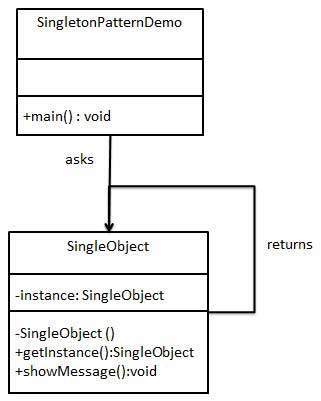
We're going to create a SingleObject class. SingleObject class have its constructor as private and have a static instance of itself.
SingleObject class provides a static method to get its static instance to outside world. SingletonPatternDemo, our demo class will use SingleObject class to get a SingleObject object.
Step 1
Create a Singleton Class.
SingleObject.java
public class SingleObject {

   //create an object of SingleObject
   private static SingleObject instance = new SingleObject();

   //make the constructor private so that this class cannot be
   //instantiated
   private SingleObject(){}

   //Get the only object available
   public static SingleObject getInstance(){
      return instance;
   }

   public void showMessage(){
      System.out.println("Hello World!");
   }
}
Step 2
Get the only object from the singleton class.
SingletonPatternDemo.java
public class SingletonPatternDemo {
   public static void main(String[] args) {

      //illegal construct
      //Compile Time Error: The constructor SingleObject() is not visible
      //SingleObject object = new SingleObject();

      //Get the only object available
      SingleObject object = SingleObject.getInstance();

      //show the message
      object.showMessage();
   }
}
SOLID PRINCIPLES
SOLID design principles in C# are basic design principles. SOLID stands for Single Responsibility Principle (SRP), Open closed Principle (OSP), Liskov substitution Principle (LSP), Interface Segregation Principle (ISP), and Dependency Inversion Principle (DIP).
Here let's learn basics of SOLID design principles using C# and .NET.
- The reasons behind most unsuccessful applications
- Solutions
- Intro to SOLID principles
- SRP
- OCP
- LSP
- ISP
- DIP

The reason behind most unsuccessful applications
Developers start building applications with good and tidy designs using their knowledge and experience. But over time, applications might develop bugs. The application design must be altered for every change request or new feature request. After some time we might need to put in a lot of effort, even for simple tasks and it might require full working knowledge of the entire system. But we can't blame change or new feature requests. They are part of software development. We can't stop them or refuse them either. So who is the culprit here? Obviously it is the design of the application.
The following are the design flaws that cause damage in software, mostly.
- Putting more stress on classes by assigning more responsibilities to them. (A lot of functionality not related to a class.)
- Forcing the classes to depend on each other. If classes are dependent on each other (in other words tightly coupled), then a change in one will affect the other.
- Spreading duplicate code in the system/application.
Solution
- Choosing the correct architecture (in other words MVC, 3-tier, Layered, MVP, MVVP and so on).
- Following Design Principles.
- Choosing correct Design Patterns to build the software based on its specifications.
Now we go through the Design Principles first and will cover the rest soon.
Intro to SOLID principles
SOLID principles are the design principles that enable us to manage most of the software design problems. Robert C. Martin compiled these principles in the 1990s. These principles provide us with ways to move from tightly coupled code and little encapsulation to the desired results of loosely coupled and encapsulated real needs of a business properly. SOLID is an acronym of the following.
- S: Single Responsibility Principle (SRP)
- O: Open closed Principle (OCP)
- L: Liskov substitution Principle (LSP)
- I: Interface Segregation Principle (ISP)
- D: Dependency Inversion Principle (DIP)
S: Single Responsibility Principle (SRP)
SRP says "Every software module should have only one reason to change".

This means that every class, or similar structure, in your code should have only one job to do. Everything in that class should be related to a single purpose. Our class should not be like a Swiss knife wherein if one of them needs to be changed then the entire tool needs to be altered. It does not mean that your classes should only contain one method or property. There may be many members as long as they relate to single responsibility.
The Single Responsibility Principle gives us a good way of identifying classes at the design phase of an application and it makes you think of all the ways a class can change. A good separation of responsibilities is done only when we have the full picture of how the application should work. Let us check this with an example.
- public class UserService
- {
- public void Register(string email, string password)
- {
- if (!ValidateEmail(email))
- throw new ValidationException("Email is not an email");
- var user = new User(email, password);
- SendEmail(new MailMessage("mysite@nowhere.com", email) { Subject="HEllo foo" });
- }
- public virtual bool ValidateEmail(string email)
- {
- return email.Contains("@");
- }
- public bool SendEmail(MailMessage message)
- {
- _smtpClient.Send(message);
- }
- }
It looks fine, but it is not following SRP. The SendEmail and ValidateEmail methods have nothing to do within the UserService class. Let's refract it.
- public class UserService
- {
- EmailService _emailService;
- DbContext _dbContext;
- public UserService(EmailService aEmailService, DbContext aDbContext)
- {
- _emailService = aEmailService;
- _dbContext = aDbContext;
- }
- public void Register(string email, string password)
- {
- if (!_emailService.ValidateEmail(email))
- throw new ValidationException("Email is not an email");
- var user = new User(email, password);
- _dbContext.Save(user);
- emailService.SendEmail(new MailMessage("myname@mydomain.com", email) {Subject="Hi. How are you!"});
- }
- }
- public class EmailService
- {
- SmtpClient _smtpClient;
- public EmailService(SmtpClient aSmtpClient)
- {
- _smtpClient = aSmtpClient;
- }
- public bool virtual ValidateEmail(string email)
- {
- return email.Contains("@");
- }
- public bool SendEmail(MailMessage message)
- {
- _smtpClient.Send(message);
- }
- }
O: Open/Closed Principle
The Open/closed Principle says "A software module/class is open for extension and closed for modification".

Here "Open for extension" means, we need to design our module/class in such a way that the new functionality can be added only when new requirements are generated. "Closed for modification" means we have already developed a class and it has gone through unit testing. We should then not alter it until we find bugs. As it says, a class should be open for extensions, we can use inheritance to do this. Okay, let's dive into an example.
Suppose we have a Rectangle class with the properties Height and Width.
- public class Rectangle{
- public double Height {get;set;}
- public double Wight {get;set; }
- }
Our app needs the ability to calculate the total area of a collection of Rectangles. Since we already learned the Single Responsibility Principle (SRP), we don't need to put the total area calculation code inside the rectangle. So here I created another class for area calculation.
- public class AreaCalculator {
- public double TotalArea(Rectangle[] arrRectangles)
- {
- double area;
- foreach(var objRectangle in arrRectangles)
- {
- area += objRectangle.Height * objRectangle.Width;
- }
- return area;
- }
- }
Hey, we did it. We made our app without violating SRP. No issues for now. But can we extend our app so that it could calculate the area of not only Rectangles but also the area of Circles as well? Now we have an issue with the area calculation issue because the way to do circle area calculation is different. Hmm. Not a big deal. We can change the TotalArea method a bit so that it can accept an array of objects as an argument. We check the object type in the loop and do area calculation based on the object type.
- public class Rectangle{
- public double Height {get;set;}
- public double Wight {get;set; }
- }
- public class Circle{
- public double Radius {get;set;}
- }
- public class AreaCalculator
- {
- public double TotalArea(object[] arrObjects)
- {
- double area = 0;
- Rectangle objRectangle;
- Circle objCircle;
- foreach(var obj in arrObjects)
- {
- if(obj is Rectangle)
- {
- area += obj.Height * obj.Width;
- }
- else
- {
- objCircle = (Circle)obj;
- area += objCircle.Radius * objCircle.Radius * Math.PI;
- }
- }
- return area;
- }
- }
Wow. We are done with the change. Here we successfully introduced Circle into our app. We can add a Triangle and calculate it's the area by adding one more "if" block in the TotalArea method of AreaCalculator. But every time we introduce a new shape we need to alter the TotalArea method. So the AreaCalculator class is not closed for modification. How can we make our design to avoid this situation? Generally, we can do this by referring to abstractions for dependencies, such as interfaces or abstract classes, rather than using concrete classes. Such interfaces can be fixed once developed so the classes that depend upon them can rely upon unchanging abstractions. Functionality can be added by creating new classes that implement the interfaces. So let's refract our code using an interface.
- public abstract class Shape
- {
- public abstract double Area();
- }
Inheriting from Shape, the Rectangle and Circle classes now look like this:
- public class Rectangle: Shape
- {
- public double Height {get;set;}
- public double Width {get;set;}
- public override double Area()
- {
- return Height * Width;
- }
- }
- public class Circle: Shape
- {
- public double Radius {get;set;}
- public override double Area()
- {
- return Radius * Radus * Math.PI;
- }
- }
Every shape contains its area with its own way of calculation functionality and our AreaCalculator class will become simpler than before.
- public class AreaCalculator
- {
- public double TotalArea(Shape[] arrShapes)
- {
- double area=0;
- foreach(var objShape in arrShapes)
- {
- area += objShape.Area();
- }
- return area;
- }
- }
Now our code is following SRP and OCP both. Whenever you introduce a new shape by deriving from the "Shape" abstract class, you need not change the "AreaCalculator" class. Awesome. Isn't it?
L: Liskov Substitution Principle

The Liskov Substitution Principle (LSP) states that "you should be able to use any derived class instead of a parent class and have it behave in the same manner without modification". It ensures that a derived class does not affect the behavior of the parent class, in other words,, that a derived class must be substitutable for its base class.
This principle is just an extension of the Open Closed Principle and it means that we must ensure that new derived classes extend the base classes without changing their behavior. I will explain this with a real-world example that violates LSP.
A father is a doctor whereas his son wants to become a cricketer. So here the son can't replace his father even though they both belong to the same family hierarchy.
Now jump into an example to learn how a design can violate LSP. Suppose we need to build an app to manage data using a group of SQL files text. Here we need to write functionality to load and save the text of a group of SQL files in the application directory. So we need a class that manages the load and saves the text of group of SQL files along with the SqlFile Class.
- public class SqlFile
- {
- public string FilePath {get;set;}
- public string FileText {get;set;}
- public string LoadText()
- {
- /* Code to read text from sql file */
- }
- public string SaveText()
- {
- /* Code to save text into sql file */
- }
- }
- public class SqlFileManager
- {
- public List<SqlFile> lstSqlFiles {get;set}
- public string GetTextFromFiles()
- {
- StringBuilder objStrBuilder = new StringBuilder();
- foreach(var objFile in lstSqlFiles)
- {
- objStrBuilder.Append(objFile.LoadText());
- }
- return objStrBuilder.ToString();
- }
- public void SaveTextIntoFiles()
- {
- foreach(var objFile in lstSqlFiles)
- {
- objFile.SaveText();
- }
- }
- }
OK. We are done with our part. The functionality looks good for now. After some time our leaders might tell us that we may have a few read-only files in the application folder, so we need to restrict the flow whenever it tries to do a save on them.
OK. We can do that by creating a "ReadOnlySqlFile" class that inherits the "SqlFile" class and we need to alter the SaveTextIntoFiles() method by introducing a condition to prevent calling the SaveText() method on ReadOnlySqlFile instances.
- public class SqlFile
- {
- public string LoadText()
- {
- /* Code to read text from sql file */
- }
- public void SaveText()
- {
- /* Code to save text into sql file */
- }
- }
- public class ReadOnlySqlFile: SqlFile
- {
- public string FilePath {get;set;}
- public string FileText {get;set;}
- public string LoadText()
- {
- /* Code to read text from sql file */
- }
- public void SaveText()
- {
- /* Throw an exception when app flow tries to do save. */
- throw new IOException("Can't Save");
- }
- }
To avoid an exception we need to modify "SqlFileManager" by adding one condition to the loop.
- public class SqlFileManager
- {
- public List<SqlFile? lstSqlFiles {get;set}
- public string GetTextFromFiles()
- {
- StringBuilder objStrBuilder = new StringBuilder();
- foreach(var objFile in lstSqlFiles)
- {
- objStrBuilder.Append(objFile.LoadText());
- }
- return objStrBuilder.ToString();
- }
- public void SaveTextIntoFiles()
- {
- foreach(var objFile in lstSqlFiles)
- {
- //Check whether the current file object is read-only or not.If yes, skip calling it's
- // SaveText() method to skip the exception.
- if(! objFile is ReadOnlySqlFile)
- objFile.SaveText();
- }
- }
- }
Here we altered the SaveTextIntoFiles() method in the SqlFileManager class to determine whether or not the instance is of ReadOnlySqlFile to avoid the exception. We can't use this ReadOnlySqlFile class as a substitute for its parent without altering SqlFileManager code. So we can say that this design is not following LSP. Let's make this design follow the LSP. Here we will introduce interfaces to make the SqlFileManager class independent from the rest of the blocks.
- public interface IReadableSqlFile
- {
- string LoadText();
- }
- public interface IWritableSqlFile
- {
- void SaveText();
- }
Now we implement IReadableSqlFile through the ReadOnlySqlFile class that reads only the text from read-only files.
- public class ReadOnlySqlFile: IReadableSqlFile
- {
- public string FilePath {get;set;}
- public string FileText {get;set;}
- public string LoadText()
- {
- /* Code to read text from sql file */
- }
- }
Here we implement both IWritableSqlFile and IReadableSqlFile in a SqlFile class by which we can read and write files.
- public class SqlFile: IWritableSqlFile,IReadableSqlFile
- {
- public string FilePath {get;set;}
- public string FileText {get;set;}
- public string LoadText()
- {
- /* Code to read text from sql file */
- }
- public void SaveText()
- {
- /* Code to save text into sql file */
- }
- }
Now the design of the SqlFileManager class becomes like this:
- public class SqlFileManager
- {
- public string GetTextFromFiles(List<IReadableSqlFile> aLstReadableFiles)
- {
- StringBuilder objStrBuilder = new StringBuilder();
- foreach(var objFile in aLstReadableFiles)
- {
- objStrBuilder.Append(objFile.LoadText());
- }
- return objStrBuilder.ToString();
- }
- public void SaveTextIntoFiles(List<IWritableSqlFile> aLstWritableFiles)
- {
- foreach(var objFile in aLstWritableFiles)
- {
- objFile.SaveText();
- }
- }
- }
Here the GetTextFromFiles() method gets only the list of instances of classes that implement the IReadOnlySqlFile interface. That means the SqlFile and ReadOnlySqlFile class instances. And the SaveTextIntoFiles() method gets only the list instances of the class that implements the IWritableSqlFiles interface, in other words, SqlFile instances in this case. Now we can say our design is following the LSP. And we fixed the problem using the Interface segregation principle by (ISP) identifying the abstraction and the responsibility separation method.
I: Interface Segregation Principle (ISP)
The Interface Segregation Principle states "that clients should not be forced to implement interfaces they don't use. Instead of one fat interface, many small interfaces are preferred based on groups of methods, each one serving one submodule.".

We can define it in another way. An interface should be more closely related to the code that uses it than code that implements it. So the methods on the interface are defined by which methods the client code needs rather than which methods the class implements. So clients should not be forced to depend upon interfaces that they don't use.
Like classes, each interface should have a specific purpose/responsibility (refer to SRP). You shouldn't be forced to implement an interface when your object doesn't share that purpose. The larger the interface, the more likely it includes methods that not all implementers can do. That's the essence of the Interface Segregation Principle. Let's start with an example that breaks the ISP. Suppose we need to build a system for an IT firm that contains roles like TeamLead and Programmer where TeamLead divides a huge task into smaller tasks and assigns them to his/her programmers or can directly work on them.
Based on specifications, we need to create an interface and a TeamLead class to implement it.
- public Interface ILead
- {
- void CreateSubTask();
- void AssginTask();
- void WorkOnTask();
- }
- public class TeamLead : ILead
- {
- public void AssignTask()
- {
- //Code to assign a task.
- }
- public void CreateSubTask()
- {
- //Code to create a sub task
- }
- public void WorkOnTask()
- {
- //Code to implement perform assigned task.
- }
- }
OK. The design looks fine for now. Later another role like Manager, who assigns tasks to TeamLead and will not work on the tasks, is introduced into the system. Can we directly implement an ILead interface in the Manager class, like the following?
- public class Manager: ILead
- {
- public void AssignTask()
- {
- //Code to assign a task.
- }
- public void CreateSubTask()
- {
- //Code to create a sub task.
- }
- public void WorkOnTask()
- {
- throw new Exception("Manager can't work on Task");
- }
- }
Since the Manager can't work on a task and at the same time no one can assign tasks to the Manager, this WorkOnTask() should not be in the Manager class. But we are implementing this class from the ILead interface, we need to provide a concrete Method. Here we are forcing the Manager class to implement a WorkOnTask() method without a purpose. This is wrong. The design violates ISP. Let's correct the design.
Since we have three roles, 1. Manager, that can only divide and assign the tasks, 2. TeamLead that can divide and assign the tasks and can work on them as well, 3. The programmer that can only work on tasks, we need to divide the responsibilities by segregating the ILead interface. An interface that provides a contract for WorkOnTask().
- public interface IProgrammer
- {
- void WorkOnTask();
- }
An interface that provides contracts to manage the tasks:
- public interface ILead
- {
- void AssignTask();
- void CreateSubTask();
- }
Then the implementation becomes:
- public class Programmer: IProgrammer
- {
- public void WorkOnTask()
- {
- //code to implement to work on the Task.
- }
- }
- public class Manager: ILead
- {
- public void AssignTask()
- {
- //Code to assign a Task
- }
- public void CreateSubTask()
- {
- //Code to create a sub taks from a task.
- }
- }
TeamLead can manage tasks and can work on them if needed. Then the TeamLead class should implement both of the IProgrammer and ILead interfaces.
- public class TeamLead: IProgrammer, ILead
- {
- public void AssignTask()
- {
- //Code to assign a Task
- }
- public void CreateSubTask()
- {
- //Code to create a sub task from a task.
- }
- public void WorkOnTask()
- {
- //code to implement to work on the Task.
- }
- }
Wow. Here we separated responsibilities/purposes and distributed them on multiple interfaces and provided a good level of abstraction too.
D: Dependency Inversion Principle
The Dependency Inversion Principle (DIP) states that high-level modules/classes should not depend on low-level modules/classes. Both should depend upon abstractions. Secondly, abstractions should not depend upon details. Details should depend upon abstractions.

High-level modules/classes implement business rules or logic in a system (application). Low-level modules/classes deal with more detailed operations; in other words they may deal with writing information to databases or passing messages to the operating system or services.
A high-level module/class that has a dependency on low-level modules/classes or some other class and knows a lot about the other classes it interacts with is said to be tightly coupled. When a class knows explicitly about the design and implementation of another class, it raises the risk that changes to one class will break the other class. So we must keep these high-level and low-level modules/classes loosely coupled as much as we can. To do that, we need to make both of them dependent on abstractions instead of knowing each other. Let's start with an example.
Suppose we need to work on an error logging module that logs exception stack traces into a file. Simple, isn't it? The following are the classes that provide the functionality to log a stack trace into a file.
- public class FileLogger
- {
- public void LogMessage(string aStackTrace)
- {
- //code to log stack trace into a file.
- }
- }
- public class ExceptionLogger
- {
- public void LogIntoFile(Exception aException)
- {
- FileLogger objFileLogger = new FileLogger();
- objFileLogger.LogMessage(GetUserReadableMessage(aException));
- }
- private GetUserReadableMessage(Exception ex)
- {
- string strMessage = string. Empty;
- //code to convert Exception's stack trace and message to user readable format.
- ....
- ....
- return strMessage;
- }
- }
A client class exports data from many files to a database.
- public class DataExporter
- {
- public void ExportDataFromFile()
- {
- try {
- //code to export data from files to database.
- }
- catch(Exception ex)
- {
- new ExceptionLogger().LogIntoFile(ex);
- }
- }
- }
Looks good. We sent our application to the client. But our client wants to store this stack trace in a database if an IO exception occurs. Hmm... okay, no problem. We can implement that too. Here we need to add one more class that provides the functionality to log the stack trace into the database and an extra method in ExceptionLogger to interact with our new class to log the stack trace.
- public class DbLogger
- {
- public void LogMessage(string aMessage)
- {
- //Code to write message in database.
- }
- }
- public class FileLogger
- {
- public void LogMessage(string aStackTrace)
- {
- //code to log stack trace into a file.
- }
- }
- public class ExceptionLogger
- {
- public void LogIntoFile(Exception aException)
- {
- FileLogger objFileLogger = new FileLogger();
- objFileLogger.LogMessage(GetUserReadableMessage(aException));
- }
- public void LogIntoDataBase(Exception aException)
- {
- DbLogger objDbLogger = new DbLogger();
- objDbLogger.LogMessage(GetUserReadableMessage(aException));
- }
- private string GetUserReadableMessage(Exception ex)
- {
- string strMessage = string.Empty;
- //code to convert Exception's stack trace and message to user readable format.
- ....
- ....
- return strMessage;
- }
- }
- public class DataExporter
- {
- public void ExportDataFromFile()
- {
- try {
- //code to export data from files to database.
- }
- catch(IOException ex)
- {
- new ExceptionLogger().LogIntoDataBase(ex);
- }
- catch(Exception ex)
- {
- new ExceptionLogger().LogIntoFile(ex);
- }
- }
- }
Looks fine for now. But whenever the client wants to introduce a new logger, we need to alter ExceptionLogger by adding a new method. If we continue doing this after some time then we will see a fat ExceptionLogger class with a large set of methods that provide the functionality to log a message into various targets. Why does this issue occur? Because ExceptionLogger directly contacts the low-level classes FileLogger and DbLogger to log the exception. We need to alter the design so that this ExceptionLogger class can be loosely coupled with those classes. To do that we need to introduce an abstraction between them so that ExcetpionLogger can contact the abstraction to log the exception instead of depending on the low-level classes directly.
- public interface ILogger
- {
- void LogMessage(string aString);
- }
Now our low-level classes need to implement this interface.
- public class DbLogger: ILogger
- {
- public void LogMessage(string aMessage)
- {
- //Code to write message in database.
- }
- }
- public class FileLogger: ILogger
- {
- public void LogMessage(string aStackTrace)
- {
- //code to log stack trace into a file.
- }
- }
Now, we move to the low-level class's initiation from the ExcetpionLogger class to the DataExporter class to make ExceptionLogger loosely coupled with the low-level classes FileLogger and EventLogger. And by doing that we are giving provision to DataExporter class to decide what kind of Logger should be called based on the exception that occurs.
- public class ExceptionLogger
- {
- private ILogger _logger;
- public ExceptionLogger(ILogger aLogger)
- {
- this._logger = aLogger;
- }
- public void LogException(Exception aException)
- {
- string strMessage = GetUserReadableMessage(aException);
- this._logger.LogMessage(strMessage);
- }
- private string GetUserReadableMessage(Exception aException)
- {
- string strMessage = string.Empty;
- //code to convert Exception's stack trace and message to user readable format.
- ....
- ....
- return strMessage;
- }
- }
- public class DataExporter
- {
- public void ExportDataFromFile()
- {
- ExceptionLogger _exceptionLogger;
- try {
- //code to export data from files to database.
- }
- catch(IOException ex)
- {
- _exceptionLogger = new ExceptionLogger(new DbLogger());
- _exceptionLogger.LogException(ex);
- }
- catch(Exception ex)
- {
- _exceptionLogger = new ExceptionLogger(new FileLogger());
- _exceptionLogger.LogException(ex);
- }
- }
- }
We successfully removed the dependency on low-level classes. This ExceptionLogger doesn't depend on the FileLogger and EventLogger classes to log the stack trace. We don't need to change the ExceptionLogger's code anymore for any new logging functionality. We need to create a new logging class that implements the ILogger interface and must add another catch block to the DataExporter class's ExportDataFromFile method.
- public class EventLogger: ILogger
- {
- public void LogMessage(string aMessage)
- {
- //Code to write message in system's event viewer.
- }
- }
And we need to add a condition in the DataExporter class as in the following:
- public class DataExporter
- {
- public void ExportDataFromFile()
- {
- ExceptionLogger _exceptionLogger;
- try {
- //code to export data from files to database.
- }
- catch(IOException ex)
- {
- _exceptionLogger = new ExceptionLogger(new DbLogger());
- _exceptionLogger.LogException(ex);
- }
- catch(SqlException ex)
- {
- _exceptionLogger = new ExceptionLogger(new EventLogger());
- _exceptionLogger.LogException(ex);
- }
- catch(Exception ex)
- {
- _exceptionLogger = new ExceptionLogger(new FileLogger());
- _exceptionLogger.LogException(ex);
- }
- }
- }
Looks good. But we introduced the dependency here in the DataExporter class's catch blocks. Yeah, someone must take the responsibility to provide the necessary objects to the ExceptionLogger to get the work done.
C# Lambdas
Lambda expressions are how anonymous functions are created. In this article and code examples, we will see how to implement lambdas in C#.
Lambda expressions are anonymous functions that contain expressions or sequence of operators. All lambda expressions use the lambda operator =>, that can be read as “goes to” or “becomes”. The left side of the lambda operator specifies the input parameters and the right side holds an expression or a code block that works with the entry parameters. Usually lambda expressions are used as predicates or instead of delegates (a type that references a method).
Expression Lambdas
Parameter => expression
Parameter-list => expression
Count => count + 2;
Sum => sum + 2;
n => n % 2 == 0
The lambda operator => divides a lambda expression into two parts. The left side is the input parameter and the right side is the lambda body.
Lambda Expression Example 1
- using System;
- using System.Collections.Generic;
- using System.Linq;
- public static class demo
- {
- public static void Main()
- {
- List<int> list = new List<int>() { 1, 2, 3, 4, 5, 6 };
- List<int> evenNumbers = list.FindAll(x => (x % 2) == 0);
- foreach (var num in evenNumbers)
- {
- Console.Write("{0} ", num);
- }
- Console.WriteLine();
- Console.Read();
- }
- }
Output
2 4 6

The preceding example loops through the entire collection of numbers and each element (named x) is checked to determine if the number is a multiple of 2 (using the Boolean expression (x % 2) == 0).
Lambda Example 2
- using System;
- using System.Collections.Generic;
- using System.Linq;
- class Dog
- {
- public string Name { get; set; }
- public int Age { get; set; }
- }
- class demo{
- static void Main()
- {
- List<Dog> dogs = new List<Dog>() {
- new Dog { Name = "Rex", Age = 4 },
- new Dog { Name = "Sean", Age = 0 },
- new Dog { Name = "Stacy", Age = 3 }
- };
- var names = dogs.Select(x => x.Name);
- foreach (var name in names)
- {
- Console.WriteLine(name);
- }
- Console.Read();
- }
- }
Output
Rex
Sean
Stacy

We create a collection, containing data from a certain class. In the example, from the class Dog (with properties Name and Age), we want to get a list that contains all the dog's names. With the keyword var, we tell the compiler to define the type of the variable depending on the result that we assigned on the right side of the equals sign.
Using Lambda Expressions with Anonymous Types
- using System;
- using System.Collections.Generic;
- using System.Linq;
- class Dog
- {
- public string Name { get; set; }
- public int Age { get; set; }
- }
- class demo{
- static void Main()
- {
- List<Dog> dogs = new List<Dog>() {
- new Dog { Name = "Rex", Age = 4 },
- new Dog { Name = "Sean", Age = 0 },
- new Dog { Name = "Stacy", Age = 3 }
- };
- var newDogsList = dogs.Select(x => new { Age = x.Age, FirstLetter = x.Name[0] });
- foreach (var item in newDogsList)
- {
- Console.WriteLine(item);
- }
- Console.Read();
- }
- }
Output
{ Age = 4, FirstLetter = R }
{ Age = 0, FirstLetter = S }
{ Age = 3, FirstLetter = S }

The newly created collection newDogsList has elements of an anonymous type taking the properties Age and FirstLetter as parameters.
Sorting using a lambda expression
The following is an examle of sorting with a lambda expression:
- var sortedDogs = dogs.OrderByDescending(x => x.Age);
- foreach (var dog in sortedDogs)
- {
- Console.WriteLine(string.Format("Dog {0} is {1} years old.", dog.Name, dog.Age));
- }
Output
Dog Rex is 4 years old.
Dog Stacy is 3 years old.
Dog Sean is 0 years old.

No comments:
Post a Comment